
Best Mac Cleaner for Video Editors
Updated
Key Takeaways
Video editing apps like Final Cut Pro, Premiere Pro, DaVinci Resolve, iMovie, and After Effects generate 20-50GB of render caches, proxy files, and disk cache per project. DeepCleanMac finds and safely removes these hidden files so you can free up disk space on your Mac and always have room for your next project.
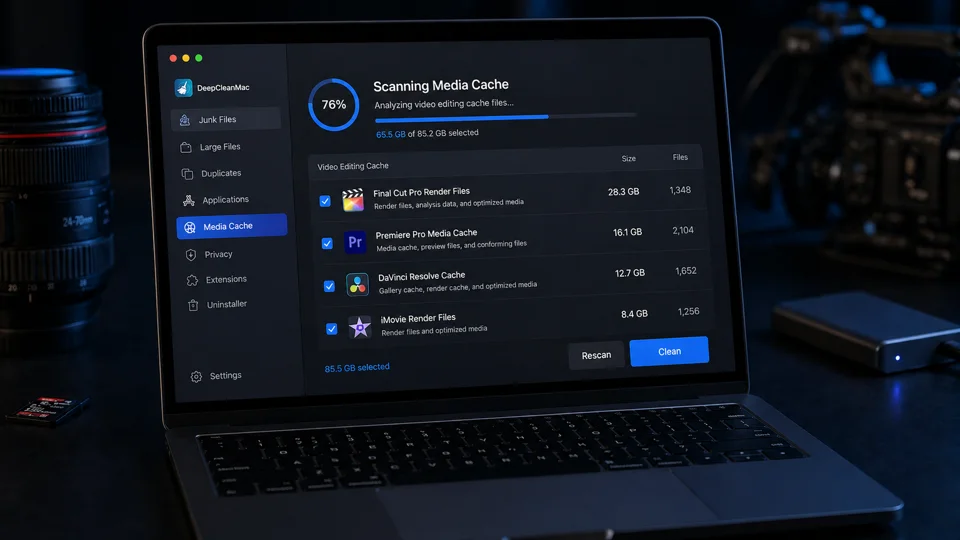
If your Mac is running out of space from video editing, you are not alone. Every project in Final Cut Pro, Premiere Pro, DaVinci Resolve, After Effects, or iMovie generates render caches, proxy media, optimized files, and export temp data - and most of it stays on your disk long after the project is delivered. A single Final Cut Pro project can leave behind 20-50GB of recoverable render files in hidden Library folders, and the Premiere Pro media cache grows silently with every timeline you touch. DeepCleanMac is purpose-built for this workflow. It scans over 200 locations where video editing apps store temporary data, shows you exactly what is safe to delete, and helps you free up disk space without touching your source footage, timelines, or project files.
Why Video Editors Run Out of Space on Mac
Render Cache Buildup
Final Cut Pro, Premiere Pro, and DaVinci Resolve store render caches that persist long after projects are finished. The Final Cut Pro cache alone can consume 10-30GB per project, and the DaVinci Resolve cache grows even larger with Fusion compositions.
Proxy Files & Media Cache
Proxy files, optimized media, and the Premiere Pro media cache created for smoother editing remain on disk even after export. The After Effects disk cache adds another 5-20GB per project. These files are often stored in hard-to-find Library folders.
iMovie & Export Temp Files
iMovie render files, failed exports, and interrupted encodes leave large temporary files in ~/Movies, /tmp, and application-specific directories. If iMovie says not enough disk space, these orphaned files are often the cause - and they are never cleaned up automatically.
How DeepCleanMac Helps Video Editors Free Up Disk Space
Clear Video Editing Cache on Mac Automatically
One click to clear Final Cut Pro cache, Premiere Pro media cache, DaVinci Resolve render cache, After Effects disk cache, and iMovie render files. No need to manually hunt through ~/Library folders. Free up 10-50GB per cleanup.
Recover Space from Old Projects
Finds leftover temp files, autosave data, and cached media from completed projects. Safely delete render files from Mac without touching your source footage or project files.
Disk Space Monitoring for Video Editors
The health dashboard shows real-time disk usage so you know when to clean before starting a new project. Get alerts before your Mac storage gets full during video editing - never hit 'not enough disk space' during an export again.
Frequently Asked Questions
How much disk space do video editing caches use on Mac?
▾
Video editing caches are among the largest space consumers on a Mac. Final Cut Pro render caches alone can use 10-30GB per project. The Premiere Pro media cache and After Effects disk cache add another 5-20GB each. After several projects, it is common to find 50-100GB of recoverable cache data on a video editor's Mac.
Is it safe to delete Final Cut Pro and Premiere Pro render caches?
▾
Yes. Render caches are temporary files that your editing software regenerates automatically when needed. You can safely clear the Final Cut Pro cache, delete Premiere Pro render files, and clear the DaVinci Resolve cache without affecting your source footage, timelines, or project files. DeepCleanMac specifically targets only cache and temp data, leaving your actual projects untouched.
How do I free up disk space on my Mac for video editing?
▾
The fastest way is to clean video editing caches, proxy files, and export temp data from completed projects. DeepCleanMac automates this by scanning all known cache locations for Final Cut Pro, Premiere Pro, DaVinci Resolve, After Effects, and iMovie. Most editors recover 20-50GB on the first scan - no need to manually navigate to ~/Library folders.
Why does iMovie say not enough disk space on my Mac?
▾
iMovie needs significant free space for render files, temporary exports, and cached media. Over time, old iMovie render files and cache data from previous projects pile up in ~/Movies and ~/Library/Containers without being cleaned. DeepCleanMac detects these leftover iMovie cache files and lets you clear them safely, often recovering 10-30GB of hidden storage.
How do I clear the DaVinci Resolve cache and After Effects disk cache on Mac?
▾
DaVinci Resolve stores its render cache in the project's CacheClip folder, which can grow to 20GB or more per project. After Effects keeps a separate disk cache that defaults to 10% of your drive. You can clear both manually through each app's settings, but DeepCleanMac finds all cache locations across both apps at once - including orphaned caches from deleted projects that the apps themselves cannot see.
Video editing generates more hidden cache data than almost any other Mac workflow. Final Cut Pro render caches, Premiere Pro media cache, After Effects disk cache, DaVinci Resolve cache files, and iMovie render files pile up silently and can leave your Mac storage full. DeepCleanMac gives video editors a fast, reliable way to clean video editing cache on Mac between projects - so you never run out of space during your next edit. Download it free and scan your Mac to see how much disk space you can recover.
Free download. No credit card required.