
Best Mac Cleaner for Developers
Updated
Key Takeaways
Xcode disk space, Docker images, node_modules, and Homebrew downloads can consume 50-100GB of hidden disk space on a developer Mac. DeepCleanMac lets you clear Xcode cache, clean Docker images, clear npm cache, and clean Homebrew cache across 200+ locations - without breaking your projects or build environments.
If you develop on a Mac, your disk space is under constant pressure. Xcode derived data and old simulators, Docker images eating disk space, node_modules disk space growing with every project, pip caches, and Homebrew downloads all accumulate silently across dozens of hidden Library folders. A typical developer Mac loses 50-100GB to these caches over a year. DeepCleanMac helps you clean your developer Mac in one click. It scans over 200 known locations where development tools store temporary and cached data, identifies what is safe to remove, and lets you free up space on your developer Mac - without breaking your projects, installed packages, or active containers.
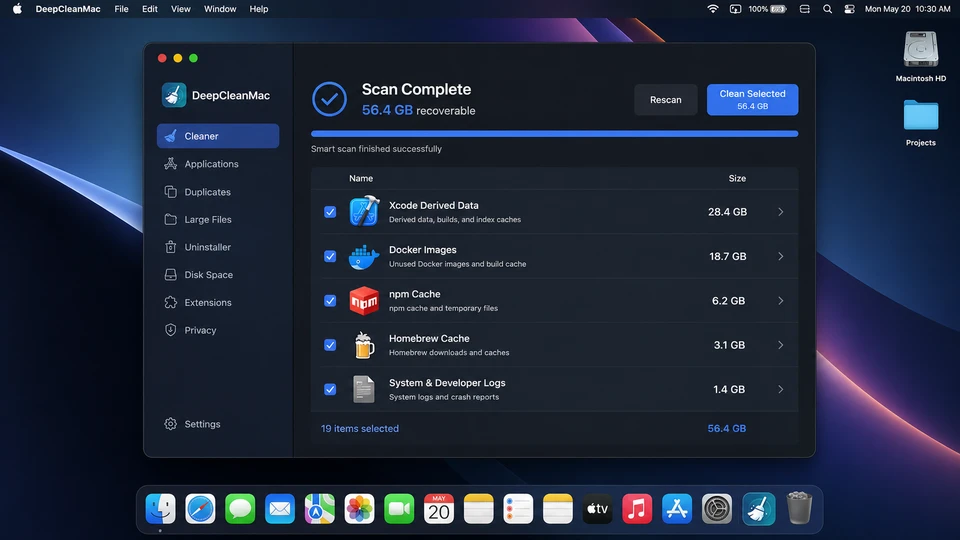
Common Developer Disk Space Problems
Xcode Derived Data
Xcode disk space grows silently as it stores build artifacts in ~/Library/Developer/Xcode/DerivedData. A few projects can generate 10-30GB of derived data that persists even after deleting the project. Old Xcode simulators add another 20-150GB if you don't delete them manually.
Docker Images & Volumes
Docker disk space on Mac grows fast. Docker Desktop stores images, containers, and volumes in ~/Library/Containers/com.docker.docker. Unused images and dangling volumes can consume 20-50GB, and cleaning Docker images manually requires multiple terminal commands.
Package Manager Caches
npm, yarn, pip, Homebrew, and CocoaPods all maintain local caches. Node_modules disk space alone can reach tens of gigabytes across projects. Combined, these package manager caches take up 5-15GB - and they rarely clean themselves up.
How DeepCleanMac Helps Developers
Deep Clean Development Caches
Clear Xcode cache, clean Xcode derived data, and delete Xcode simulators you no longer need - all in one click. Recover 10-30GB without manually navigating Library folders.
Package Cache Cleanup
Clear npm cache, clean Homebrew cache, and remove pip/yarn/CocoaPods caches that are safe to delete. Your installed packages and dependencies stay untouched.
Health Dashboard for Monitoring
Monitor disk usage in real time. Get alerts before your Mac runs out of space during a long build or CI run. Track CPU and memory alongside disk usage.
Frequently Asked Questions
How much disk space can developers recover with DeepCleanMac?
▾
Most developers recover 20-60GB on the first scan. The biggest gains come from Xcode derived data (10-30GB), Docker images and volumes (20-50GB), and package manager caches from npm, yarn, pip, and Homebrew (5-15GB). Results vary based on how many tools and projects you work with.
Will cleaning development caches break my projects or dependencies?
▾
No. DeepCleanMac only removes cached and temporary data - not your source code, installed packages, or project files. Xcode will regenerate derived data on the next build. Package managers will re-download cached packages only when needed. Your active Docker containers are never touched.
How often should developers clean their Mac's dev caches?
▾
We recommend running DeepCleanMac monthly or whenever you finish a major project. Developers who work with multiple Xcode projects or Docker containers may want to clean every two weeks. The health dashboard alerts you when disk usage gets high so you never have to guess.
Does DeepCleanMac clean node_modules and vendor folders?
▾
DeepCleanMac targets package manager caches stored in global directories like ~/.npm, ~/Library/Caches/Homebrew, and ~/Library/Caches/pip. It does not delete project-level node_modules or vendor folders, so your active projects continue to work without reinstalling dependencies.
Is DeepCleanMac safe to use alongside Homebrew, Docker Desktop, and Xcode?
▾
Yes. DeepCleanMac only removes temporary and cached data that these tools regenerate automatically. Homebrew formulas, Docker containers, and Xcode projects remain intact. According to Apple's developer documentation, derived data and build caches are safe to delete and will be recreated on the next build.
Development tools are some of the biggest consumers of Mac disk space, but most of what they store is temporary, cached, and safe to remove. Whether you need to clear Xcode cache, clean Docker images, or free up node_modules disk space, DeepCleanMac is the fastest way to clean your developer Mac - without hunting through Library folders or worrying about breaking a build. Download it free and see how much space your dev environment is hiding.
Free download. No credit card required.